


BlockerX: Content Blocker
4.43.72K Reviews
App Specs
- Version
- 5.0.81
- Updated On
- License
- Free
- Downloads
- 5,000,000+
- Developer
- Atmana Tech
- Categories
- Productivity
- Platform
- Android, iOS
Screenshots
 Analysis by AppCompare
When I want to change an online habit, relying on willpower alone can make every moment of temptation feel like a fresh negotiation. A blocker can add useful friction: it helps make certain browsing choices harder to reach while I focus on what I want to do instead. BlockerX: Porn Blocker is built around that idea, with a focus on blocking adult content and reducing distractions. I’d approach it as a practical aid for building boundaries, not a substitute for personal support or a guarantee that every unwanted page will be stopped.
Starting with a clear expectation
BlockerX is a free productivity app from Atmana Tech. Its central purpose is straightforward: help users block apps and websites, including pornography, and support more focused browsing. That makes it relevant if your goal is to limit exposure to particular content or reduce a familiar route into distraction. It is less suited to someone looking for a general task manager, a full device-management system, or a tool that can make behavioral change effortless.
The app has a 4.4 average from around 272,000 ratings and over 5 million installs, so it has reached a substantial audience. It is rated for Teens, and the current version is 5.0.41. Those details are useful context, but they don’t tell me whether the app fits a particular household or personal situation. I’d still decide based on the boundaries you want, the devices involved, and how much control you need over your own browsing.
Make the first setup serve one real goal
Before turning on any blocker, I’d write down the specific situation I want to change. “Use my phone less” is too broad to guide a useful setup. “Avoid opening certain sites when I’m meant to be working” is more actionable. A narrow first goal helps you assess whether the app is useful without expecting it to solve several unrelated habits at once.
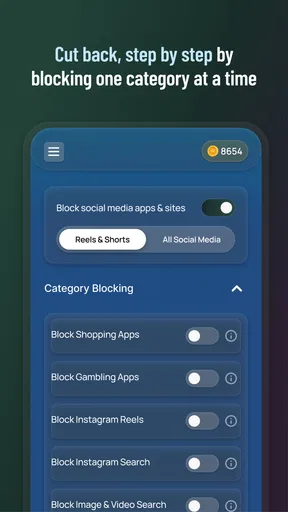
As you set it up, pay attention to what you are choosing to block and why. A boundary that is too broad may interfere with ordinary browsing; one that is too narrow may not address the pattern you care about. I’d begin with the clearest, most relevant categories or destinations available in the app, then review the result after using your phone normally. If something essential is caught up in the restriction, refine the setup rather than abandoning the whole idea.
BlockerX is free to download, with in-app purchases listed from $0.49 to $349.99 per item. I’d check the purchase details inside the app before committing to anything and treat paid options as optional rather than assuming they are required for the basic purpose. That is especially sensible if you are only testing whether a blocker fits your routine.
Turn a block into a useful first success
A meaningful first success doesn’t have to be a dramatic streak or a perfect week. It can be noticing the moment you would usually open a distracting site, finding that the route is blocked, and choosing what to do next. I’d decide on that next action in advance: return to the document I was working on, put the phone down, or take a short break away from the screen. The blocker can interrupt a pattern, but having an alternative ready makes the interruption more useful.
Worth Reading Before You Choose

EA SPORTS FC Mobile 26 Is a Bigger Football Game, but It Takes Time

Flipboard Shows What News Apps Must Do Beyond the Feed

Switching to Android Auto Means Rethinking Your Driving Routine

Google Calendar Makes a Crowded Week Easier to Manage

Ludo King Makes the Most of the Minutes Between Plans

Baby Panda World Brings Quick Play to Modern Phones, but Its Game Library Feels Busy
For example, imagine you reach for your phone during a quiet stretch of a workday and begin drifting toward a site you meant to avoid. A block can create a pause at exactly that point. If you use the pause to reopen your work or step away for a moment, the app has supported a concrete decision rather than merely displaying a barrier. That small, repeatable moment is a more realistic early measure of progress than expecting urges to disappear.
One practical tip is to review the boundary when you are calm, not while you are frustrated by a block. If a restriction catches something you need, note what happened and adjust it later. Making changes in the heat of the moment can weaken a boundary you set for a reason; never reviewing it can make the app feel unnecessarily restrictive. A deliberate review keeps the choice yours while avoiding impulsive changes.
Understand what blocking can and cannot do
I would not treat a blocker as an all-purpose filter or a promise that every unwanted result will be caught. Browsing can involve different sites, apps, and routes to content, and the usefulness of a restriction depends on how closely it matches the behavior you are trying to change. If a particular page or app remains accessible, that does not automatically mean the entire approach is pointless; it may mean the boundary needs attention or that a different kind of support would help more.
There is also a trade-off between convenience and accountability. A restriction is easiest to live with when it supports a decision you already want to make. If you mainly want a quick, casual way to cut down on distractions, a built-in device limit or a simple change to your browsing routine may be enough. If you want a more focused tool aimed specifically at adult-content blocking, BlockerX is more directly aligned with that purpose.
Some people benefit from involving someone they trust when working on a difficult habit; others would rather keep the process private. I’d choose the level of outside support that feels appropriate rather than treating disclosure as a requirement. If the issue is causing serious distress or interfering with daily life, an app can be one small practical aid, but it should not be mistaken for professional care.
Who is likely to find it useful
I can see BlockerX making sense for someone who has identified a recurring online trigger and wants a dedicated tool to help create distance from it. It may also suit a user who values a clear boundary more than a broad collection of productivity features. The key is to start with a realistic aim and check whether the app’s blocking approach fits the way you actually use your phone.
It may be the wrong choice if you need a guaranteed filter for every device in a household, want a comprehensive parental-control system, or expect a blocker to remove the underlying urge by itself. The Teen content rating is worth considering when deciding whether it is appropriate for a younger user, but a rating alone does not settle what a family should allow. I’d make that decision with the young person’s needs and the household’s expectations in mind.
For general time management, I would compare it with the tools already built into a phone: screen-time controls, app limits, and notification settings can be simpler when the problem is broad overuse rather than a particular type of content. For a specific adult-content boundary, a dedicated blocker has a more focused role. The best choice depends on the source of the distraction, not on which app has the longest feature list.
Keep the next step modest
After the first few days, I’d ask two questions: did the app interrupt the situation I wanted to change, and did that interruption help me make a better next choice? If the answer to both is yes, keep the boundary and build on that routine. If the app creates more friction than value, adjust what you block or consider a simpler alternative. That check prevents installation from becoming a symbolic gesture with no practical follow-through.
The most useful way to think about BlockerX is as a boundary-setting aid, not a complete solution. Used with a clear goal and a plan for what to do when a block appears, it can support a more intentional relationship with online content. If you need broad device supervision, a different tool may fit better; if you want targeted help with porn-related browsing, this app is worth evaluating carefully.
Setting Up Your Digital Guardian
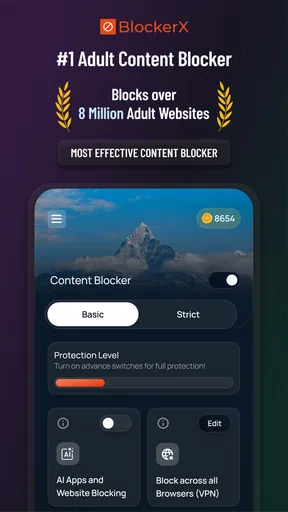
First things first, getting started with BlockerX is a breeze. You download it, set up an account, and right away, you’re greeted with a clean and simple interface. The setup process is straightforward, with step-by-step instructions that even the least tech-savvy among us can follow. Within minutes, you’ve got a powerful blocker ready to go.
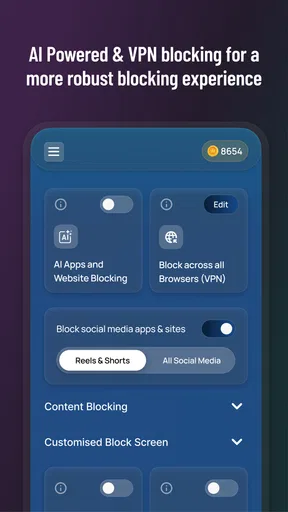
The app prides itself on ease of use. Once installed, you can enable the blocking feature with just a toggle. It's like flipping a switch to safeguard your online space. The app also allows you to set up a password, so only you can change the settings. Pretty neat, right?
Features That Stand Out
What really impressed me about BlockerX is its robust feature set. You’re not just getting a porn blocker; you’re getting a full-fledged content guardian. Here’s a breakdown of what you can expect:
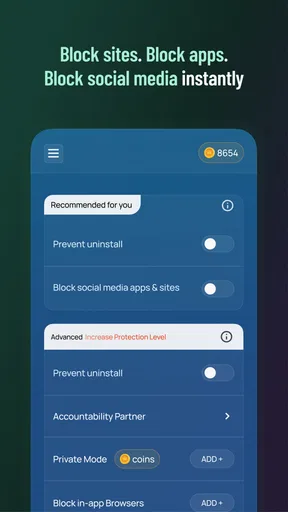
- Customizable Block Lists: You can add specific sites to your block list, giving you control over what you want to avoid.
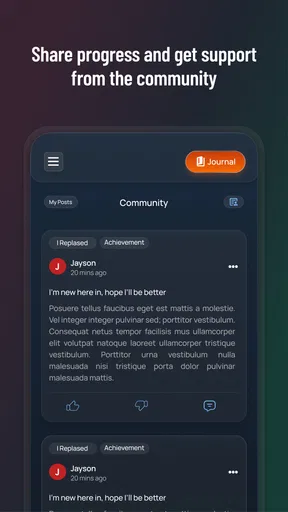
- Community Support: You’re not alone in this. There's a built-in community feature where users can support each other, share tips, and keep each other motivated.
- Accountability Partner: You can choose a friend or family member to be your accountability partner. They’ll get notifications if you try to disable the blocker, adding another layer of commitment.
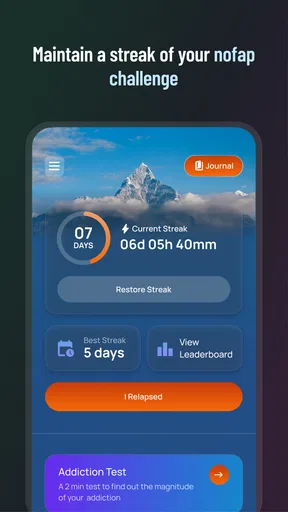
- Daily Challenges and Streaks: The app encourages you to maintain a streak of clean browsing days, adding a fun, gamified element to staying on track.
Performance and Reliability
In terms of performance, BlockerX does a stellar job. During my time using it, the app consistently blocked inappropriate content across various browsers and apps. It’s compatible with both Android and iOS, and I didn’t notice any significant impact on my device’s speed or battery life.
The app updates regularly, ensuring it stays ahead of new and emerging threats. This is crucial because the internet is always evolving, and having an app that evolves with it gives you peace of mind.
Why You Might Need It
Let’s face it, the internet is a double-edged sword. It’s full of amazing content but also has its darker corners. Whether you’re a parent looking to protect your kids, or someone wanting to avoid distractions and unwanted content, BlockerX can be a game-changer.
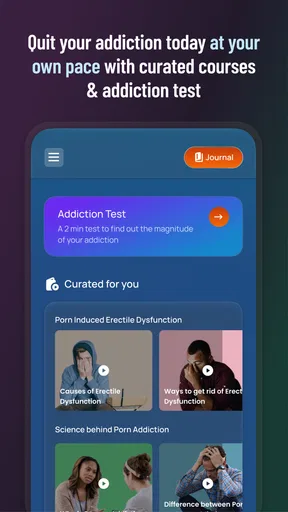
The app is particularly useful for those who are trying to break habits or addictions related to online content. It provides not just a blocking service, but also a support system through its community and accountability features.
Wrapping It Up
All in all, BlockerX: Porn Blocker is more than just a blocker; it’s a comprehensive solution for anyone looking to take control of their online experience. Its user-friendly interface, coupled with robust features and community support, makes it a standout choice. Whether you’re looking to improve productivity, protect your family, or just need a little help staying on the right path, this app is definitely worth checking out.
If you’re ready to take control of your digital life, you can download BlockerX from the App Store or Google Play. It’s time to browse with confidence!
Pros
- Effective content filtering tool.
- Simple and user-friendly interface.
- Customizable blocking settings.
- Supports multiple devices simultaneously.
- Offers community support options.
Cons
- Limited free version features.
- May affect browsing speed.
- Subscription required for premium.
- Not foolproof against VPNs.
- Occasional false positives in blocking.
FAQs for BlockerX: Content Blocker
What features does BlockerX offer to help block adult content?
BlockerX is designed to effectively block adult content across various websites and apps. It features a comprehensive filter that automatically blocks inappropriate content using advanced algorithms. Additionally, it offers a community support system, accountability partner feature, and daily motivational articles to help maintain focus and promote a healthier digital experience.
Is BlockerX easy to install and use for beginners?
Yes, BlockerX is user-friendly and easy to set up. The installation process is straightforward, requiring just a few simple steps. Once installed, the app provides an intuitive interface that allows users to easily customize their settings and manage blocked content without requiring advanced technical knowledge.
Can BlockerX be used on multiple devices?
BlockerX supports multiple devices, including smartphones, tablets, and computers. Users can sync their settings across all devices, ensuring consistent protection from unwanted content. This feature is especially useful for families or individuals who use multiple devices throughout the day.
Does BlockerX offer any parental control features?
Yes, BlockerX includes robust parental control features that allow guardians to manage and restrict access to adult content on their children's devices. Parents can set up custom filters, monitor usage, and receive alerts about any attempts to access blocked content, providing peace of mind and a safer browsing environment for children.
Is there a free version of BlockerX, and what are the limitations?
BlockerX offers a free version with basic content blocking capabilities. However, the premium version provides enhanced features such as advanced filtering options, unlimited customer support, and the ability to add an accountability partner. Users can choose to upgrade to the premium version for a more comprehensive experience.


